
Auto Grading & Scoring
Save time and effort in assessing quizzes with advanced automatic grading and scoring functionalities.

Multiple Grading Methods
Use different grading styles like points, percentages, correct answers, or manual evaluation depending on your quiz needs.
Flexible Pass Score Logic
Establish custom passing criteria using percentage scores, number of points scored, or unique quiz requirements.
Advanced Scoring Calculations
Use weighted points and answer-based scores to make your quiz evaluations more dynamic and accurate.
Detailed Result Evaluation
Use quiz analysis with detailed breakdowns of results, including scores, right answers, wrong answers, and user progress.

Different Quiz Scoring Types
- Percentage Scoring
- Point Scoring
- Keyword Scoring
Select the scoring model that is most appropriate for your quiz requirements and the type of results you would like to generate. These scoring methods help create more accurate evaluations and personalized quiz experiences for users.
Advanced Score Calculation
Create more accurate and flexible quiz evaluations with advanced answer scoring options. Automatically score your quiz questions such as checkbox, matching, and fill in the blanks even with the availability of both exact and partial scoring techniques. You can now award full marks for correct answers and partially score when necessary.

Instant Answer Feedback
Give users clear and flexible result feedback with options to show correct answers, indicate right or wrong responses, highlight only incorrect answers, or immediately finish the quiz after a single wrong attempt. This helps you control how detailed or strict the result experience should be.
Personalized Result Messages
Configure dynamic feedback messages based on your performance using intervals. Your messages will depend on your percentage intervals, number of points scored, or keywords.

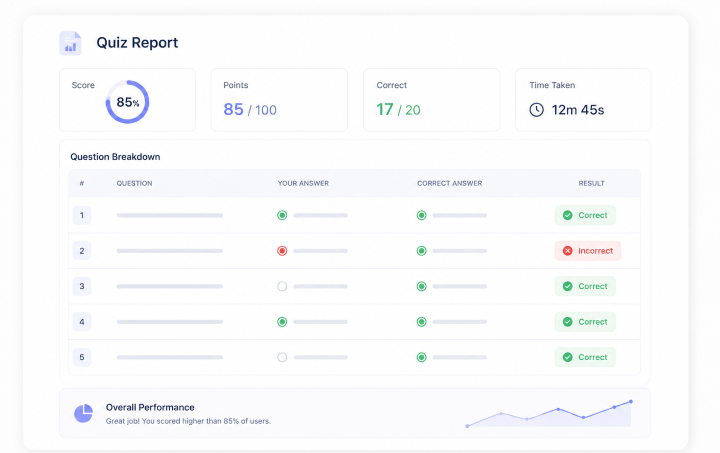
Detailed Quiz Reports For Scores
Provide a detailed results breakdown that includes question-by-question analysis, correct and incorrect answers, and overall performance data such as score, points, and completion duration.
Export & Share Results
Easily export quiz results in multiple formats like PDF and XLSX for reporting, analysis, or record keeping. This allows you to store, review, and share user performance data outside of your WordPress dashboard whenever needed. It's especially useful for teams, educators, and businesses that need structured reports or want to keep external archives of quiz results.
Leaderboards
Design a competitive leaderboard system where users are ranked according to their score. This will help enhance engagement by showcasing the best performers and motivating users to do better.


Frontend User Reports
Display personalized quiz results through shortcodes that display user scorecards and performance information. With features such as the User Page shortcode, results history, and even the complete User Dashboard addon, users will be able to monitor their progress as well as track down their past quizzes.
Automated Result Delivery
Automatically send quiz results to users right after completion via email, including scores, performance details, and downloadable reports. You can configure everything from simple result notifications to fully branded PDF reports with customized email messages and delivery methods.

Use Cases
See how you can use the scoring feature.
Personality Quiz
The final scores indicate which personality type the user is.
Educational Tests
Scores are used to measure knowledge and academic performance.
Employee Training
Scores assess the progress of the users in terms of learning.
Certification Exams
Scores must be high enough to pass the tests to get certification.
Language Level Test
Assess users' language skills and determine their proficiency level accurately.
How It Works
Create Quiz
Build your quiz by adding questions, answers, and structure.
Configure Grading Settings
Set up scoring rules,choose the convenient scoring system.
Publish Your Quiz
Make your quiz live so users can start taking it and receiving results.
Frequently Asked Questions
How does automated result delivery work in Quiz Maker by AYS?
Automated result delivery sends user results instantly after quiz completion. This process is done automatically by the Quiz Maker plugin through score calculations and grading procedures.
Can I send quiz results directly to users via email?
Yes, the test results can be automatically delivered to users via email once they complete their test. This will enable you to provide feedback that includes scores, answers, and any customized messages.
Is it possible to send PDF reports of quiz results?
Yes, the plugin is able to provide users with PDF reports containing all the information regarding their quiz results, such as scores and questions breakdown.
What types of result sending methods are available?
You can send results via email, PDF attachments, or a combination of both. This gives you flexibility to choose the best format based on your quiz type and audience.
Can I customize the email message sent with results?
Yes, you can customize the email content fully, which includes text, branding, and personalized messages that will fit into your quiz style.
Why is scoring important in quizzes?
Scoring measures performance and allows quiz responses to be translated into something more useful, such as grades or outcomes.
Can I use automated results for different types of quizzes?
Yes, automated results work for all quiz types, including educational tests, personality quizzes, training, certifications, and lead generation quizzes.
Need More Details?
Explore the Quiz Maker documentation for detailed options, settings, and best practices.

