


 Developers
 Play Console
Report issues so we can fix bugs.
G+ CommunityProvide feedback and discuss ideas with other developers.
The paging library makes it easier for your app to gradually load information as needed from a data source, without overloading the device or waiting too long for a big database query.
Overview
Many apps work with large sets of data, but only need to load and display a small portion of that data at any time. An app might have thousands of items that it could potentially display, but it might only need access to a few dozen of them at once. If the app isn't careful, it can end up requesting data it doesn't actually need, placing a performance burden on the device and the network. If the data is stored or synchronized with a remote database, this can also slow the app and waste the user's data plan.
While existing Android APIs allowed for paging in content, they came with significant constraints and drawbacks:
CursorAdaptermakes it easier to map database query results toListViewitems, but it runs database queries on the UI thread, and pages content in inefficiently with aCursor. For more details on the drawbacks to usingCursorAdapter, see the blog post Large Database Queries on Android.AsyncListUtilallows for paging position-based data into aRecyclerView, but doesn't allow for non-positional paging, and it forces nulls-as-placeholders in a countable data set.
The new paging library addresses these issues. This library contains several classes to streamline the process of requesting data as you need it. These classes also work seamlessly with existing architecture components, like Room.
Classes
The Paging Library provides the following classes, as well as additional supporting classes:
DataSource-
Use this class to define a data source you need to pull paged data from. Depending on how you need to access your data, you would extend one of its subclasses:
- Use
PageKeyedDataSourceif pages you load embed next/previous keys. For example, if you're fetching social media posts from the network, you may need to pass a nextPage token from one load into a subsequent load. - Use
ItemKeyedDataSourceif you need to use data from item N to fetch item N+1. For example, if you're fetching threaded comments for a discussion app, you might need to pass the ID of one comment to get the contents of the next comment. - Use
PositionalDataSourceif you need to fetch pages of data from any location you choose in your data store. This class supports requesting a set of data items beginning from whatever location you select, like "Return the 20 data items beginning with location 1200".
If you use the Room persistence library to manage your data, it can generate a
DataSource.Factoryto producePositionalDataSourcesfor you automatically, for example:@Query("select * from users WHERE age > :age order by name DESC, id ASC") DataSource.Factory<Integer, User> usersOlderThan(int age); - Use
PagedList-
This class loads data from a
DataSource. You can configure how much data is loaded at a time, and how much data should be prefetched, minimizing the amount of time your users have to wait for data to be loaded. This class can provide update signals to other classes, such asRecyclerView.Adapter, allowing you to update yourRecyclerView's contents as the data is loaded in pages. PagedListAdapter-
This class is an implementation of
RecyclerView.Adapterthat presents data from aPagedList. For example, when a new page is loaded, thePagedListAdaptersignals theRecyclerViewthat the data has arrived; this lets theRecyclerViewreplace any placeholders with the actual items, performing the appropriate animation.The
PagedListAdapteralso uses a background thread to compute changes from onePagedListto the next (for example, when a database change produces a newPagedListwith updated data), and calls thenotifyItem…()methods as needed to update the list's contents.RecyclerViewthen performs the necessary changes. For example, if an item changes position betweenPagedListversions, theRecyclerViewanimates that item moving to the new location in the list. LivePagedListBuilder-
This class generates a
LiveData<PagedList>from theDataSource.Factoryyou provide. Furthermore, if you use the Room persistence library to manage your database, the DAO can generate theDataSource.Factoryfor you, usingPositionalDataSource, for example:@Query("SELECT * from users order WHERE age > :age order by name DESC, id ASC") public abstract LivePagedListProvider<Integer, User> usersOlderThan(int age);The
Integerparameter tells Room to usePositionalDataSourcewith position-based loading under the hood.
Together, the components of the Paging Library organize
a data flow from a background thread producer, and presentation on the UI
thread. For example, when a new item is inserted in your database, the
DataSource is
invalidated, and the
LiveData<PagedList>
produces a new
PagedList on a
background thread.

That newly-created
PagedList is sent to
the
PagedListAdapter
on the UI thread. The
PagedListAdapter
then uses DiffUtil on a background thread to
compute the difference between the current list and the new list. When the
comparison is finished, the
PagedListAdapter
uses the list difference information to make appropriate call to RecyclerView.Adapter.notifyItemInserted() to signal that a new item
was inserted.
The RecyclerView on the UI thread then knows
that it only has to bind a single new item, and animate it appearing on screen.
Database Sample
The following code sample shows all the pieces working together.
As users are added, removed, or changed in the database, the RecyclerView's content is automatically and
efficiently updated:
@Dao
interface UserDao {
    @Query("SELECT * FROM user ORDER BY lastName ASC")
    public abstract DataSource.Factory<Integer, User> usersByLastName();
}

class MyViewModel extends ViewModel {
    public final LiveData<PagedList<User>> usersList;
    public MyViewModel(UserDao userDao) {
        usersList = new LivePagedListBuilder<>(
                userDao.usersByLastName(), /* page size */ 20).build();
    }
}

class MyActivity extends AppCompatActivity {
    @Override
    public void onCreate(Bundle savedState) {
        super.onCreate(savedState);
        MyViewModel viewModel = ViewModelProviders.of(this).get(MyViewModel.class);
        RecyclerView recyclerView = findViewById(R.id.user_list);
        UserAdapter<User> adapter = new UserAdapter();
        viewModel.usersList.observe(this, pagedList -> adapter.submitList(pagedList));
        recyclerView.setAdapter(adapter);
    }
}

class UserAdapter extends PagedListAdapter<User, UserViewHolder> {
    public UserAdapter() {
        super(DIFF_CALLBACK);
    }
    @Override
    public void onBindViewHolder(UserViewHolder holder, int position) {
        User user = getItem(position);
        if (user != null) {
            holder.bindTo(user);
        } else {
            // Null defines a placeholder item - PagedListAdapter will automatically invalidate
            // this row when the actual object is loaded from the database
            holder.clear();
        }
    }
    public static final DiffUtil.ItemCallback<User> DIFF_CALLBACK =
            new DiffUtil.ItemCallback<User>() {
        @Override
        public boolean areItemsTheSame(@NonNull User oldUser, @NonNull User newUser) {
            // User properties may have changed if reloaded from the DB, but ID is fixed
            return oldUser.getId() == newUser.getId();
        }
        @Override
        public boolean areContentsTheSame(@NonNull User oldUser, @NonNull User newUser) {
            // NOTE: if you use equals, your object must properly override Object#equals()
            // Incorrectly returning false here will result in too many animations.
            return oldUser.equals(newUser);
        }
    }
}
Loading Data
There are two primary ways to page data with the Paging Library:
Network or Database
First, you can page from a single source - either local storage or network. In
this case, use a LiveData<PagedList>
to feed loaded data into the UI, such as in the above sample.
To specify your source of data, pass a DataSource.Factory to LivePagedListBuilder.

When observing a database, the database will ‘push’ a new PagedList when content changes occur. In network paging cases (when the backend doesn’t send updates), a signal such as swipe-to-refresh can ‘pull’ a new PagedList by invalidating the current DataSource. This refreshes all of the data asynchronously.
The memory + network Repository implementations in the
PagingWithNetworkSample
show how to implement a network
DataSource.Factory
using Retrofit while handling
swipe-to-refresh, network errors, and retry.
Network and Database
In the second case, you may page from local storage, which itself pages additional data from the network. This is often done to minimize network loads and provide a better low-connectivity experience - the database is used as a cache of data stored in the backend.
In this case, use a LiveData<PagedList>
to page content from the database, and pass a
BoundaryCallback
to the LivePagedListBuilder
to observe out-of-data signals.
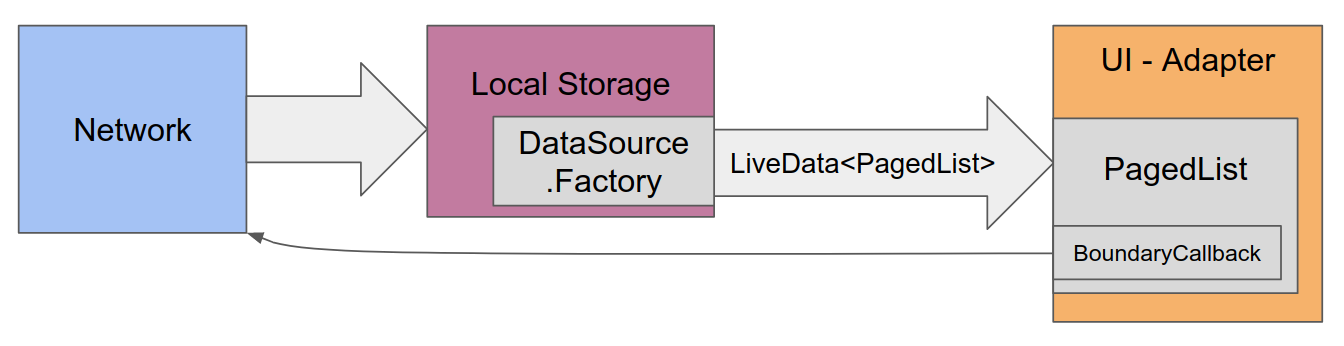
Then connect these callbacks to network requests, which will store the data directly in the database. The UI is subscribed to database updates, so new content flows automatically to any observing UI.
The database + network Repository in the
PagingWithNetworkSample
shows how to implement a network BoundaryCallback
using Retrofit, while handling
swipe-to-refresh, network errors, and retry.

