


 Things
In this document
Android Things lets you build professional, mass-market products on a trusted platform, without previous knowledge of embedded system design. It reduces the large, upfront development costs and the risks inherent in getting your idea off the ground. When you're ready to ship large quantities of devices, your costs also scale linearly and ongoing engineering and testing costs are minimized with Google-provided updates.
Hardware
We work with SoC partners to build Android Things certified SoMs (System-on-Modules) and carrier boards that have:
- Integrated Parts - SoMs integrate the SoC (System-on-chip), RAM, flash storage, WiFi, Bluetooth and other components onto a single board and come with all of the necessary FCC certifications. When you want to mass produce your device, you can optimize your board design by flattening existing modules onto a PCB to save costs and space.
- A Google BSP - The Board Support Package (BSP) is managed by Google. This gives you a trusted platform to develop on with standard updates and fixes from Google.
- Differentiated hardware - Our partners provide development boards with different SoMs and form factors to suit your needs, giving you choice and flexibility.
See Developer Kits for a list of SoMS and their corresponding carrier boards.
SDK
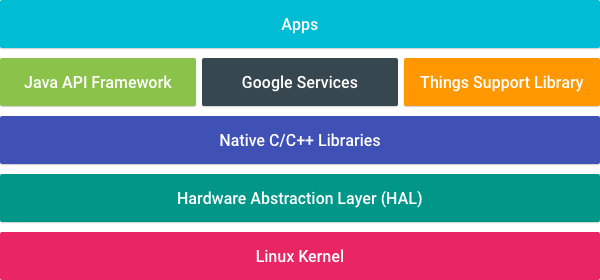
Android Things extends the core Android framework with additional APIs provided by the Things Support Library, which lets you integrate with new types of hardware not found on mobile devices.
Developing apps for embedded devices is different from mobile in a few important ways such as:
- More flexible access to hardware peripherals and drivers than mobile devices
- System apps are not present to optimize startup and storage requirements
- Apps are launched automatically on startup to immerse your users in the app experience.
- Devices expose only one app to users, instead of multiple like with mobile devices.
See the SDK Overview for more information on the similarities and differences between Android Things and the Android framework.
Console

When you're ready to start building prototypes and devices, the Android Things Console provides tools to install and update the system image on supported hardware devices. This allows you to push updates to users in the field as well as test deployments on your own hardware. Using the console, you can:
- Download and install the latest Android Things system image
- Build factory images that contain OEM applications along with the system image
- Push over-the-air (OTA) updates, including OEM applications and the system image, to devices
See the Console documentation for more information on all of its features.
Get started
When developing for Android Things, you'll use Android Studio and many of the same tools as mobile development. If you're not already familiar with Android and hardware development, our tutorials and guides will get you up and running quickly.
Get a developer kit
To start, all you need is a developer kit and the required peripherals for the device that you want to build. See Getting Started with Kits for more information.
Next steps
Once you've gotten a developer kit and have ran your first sample, learn about how to turn your ideas into reality in Prototyping Devices, which goes over common hardware concepts and how to take an early proof-of-concept to a working prototype.
In addition, see the following resources for in-depth documentation and code samples:

