Focused crawls are collections of frequently-updated webcrawl data from narrow (as opposed to broad or wide) web crawls, often focused on a single domain or subdomain.
Starting tomorrow Tuesday, September 26, 2023 we are updating the service endpoints for organizations with GitHub Copilot Chat beta enabled. If your organization uses a firewall to restrict network traffic, we recommend updating your allowlist to include *.githubcopilot.com if you haven’t done so already. This endpoint is required to deliver Copilot Chat messages.
If you are not ready to upgrade to this new endpoint, you can pin your GitHub Copilot Chat version to 0.7.1 or earlier.
If your organization doesn’t use a firewall to restrict network traffic, then no change is necessary. For a complete list of GitHub Copilot service endpoints, see our docs.
Node 16 has reached its end of life, prompting us to initiate its deprecation process for GitHub Actions. Our plan is to transition all actions to run on Node 20 by Spring 2024. We will actively monitor the migration's progress and gather community feedback before finalizing the transition date. Starting October 23rd, workflows containing actions running on Node 16 will display a warning to alert users about the upcoming migration.
Passkeys are a replacement for passwords when signing in, providing higher security, ease-of-use, and loss-protection. They are now generally available on GitHub.com for all users. By using a passkey you no longer need to enter a password, or even your username, when you sign in – nor do you need to perform 2FA, if you have 2FA enabled on your account. This is because passkeys validate your identity, as well as possession of a device, so they count as two authentication factors in one. Once enrolled, you can register a brand new passkey and upgrade many security keys to passkeys.
Actions customers will now be able to clear stuck workflows by forcing a cancel request from the REST API. This is a new feature and the existing endpoint to cancel a workflow run will remain unchanged.
Sometimes an Actions workflow can become stuck in a state that will not respond to a cancel request. This could block other workflows from executing and would often require customers to contact GitHub Support to resolve the issue. Going forward, customers can invoke force-cancel from the REST API, which will bypass conditions that would otherwise cause the workflow execution to continue. Customers should still only use force-cancel if the workflow fails to respond to POST /repos/{owner}/{repo}/actions/runs/{run_id}/cancel.
The "GitHub EMU Connector" is maintained and supported by our partner, Ping Identity. Ping additionally maintains their own release notes for this connector.
With CodeQL model packs for Java, users can improve their code scanning results by ensuring that any custom Java libraries and frameworks used by their codebase are recognised by CodeQL.
The out-of-the-box CodeQL threat models provide great coverage for identifying large numbers of potential vulnerabilities in GitHub repositories using code scanning. We are continually working to improve CodeQL's ability to recognize and track potential sources of untrusted data to potentially-vulnerable locations ('sinks'). To do that, we keep a close eye on the most widely-used open-source libraries and frameworks. That way, CodeQL can recognize untrusted data that enters an application through, for example, commonly-used web frameworks. We are even using advances in AI to boost our threat modeling efforts and help developers write even more secure code.
There will always be cases which are not covered by CodeQL's standard threat models, such as custom-built or inner-sourced frameworks and libraries. Using CodeQL's new model pack functionality for Java (beta), security teams and security-conscious developers can create custom models that help CodeQL detect and flag additional security vulnerabilities. These custom model packs work seamlessly in GitHub code scanning, which means developers get the most relevant code scanning alerts during their day-to-day work.
CodeQL model packs are part of the CodeQL package management ecosystem. The packs contain structured data which describe whether a method within a library is a taint source, sink, or propagator (also known as a flow summary). You can create CodeQL model packs for Java using the CodeQL model editor, a new feature in the CodeQL extension for VS Code. The CodeQL model editor includes support for:
identifying methods in your codebase that aren't recognised by the standard CodeQL analysis
interactively classifying those methods as a source, sink, or summary
automatically generating a CodeQL model pack that can be easily added to code scanning.
For more information about using CodeQL model packs in code scanning, see:
You can now easily use GitHub Enterprise Importer to migrate your source code, revision history, pull requests, reviews and comments when moving to GitHub from your self-hosted Bitbucket instance.
To learn more about the benefits of switching from Bitbucket to GitHub, check our brand new blog post.
GitHub Actions Importer now supports migrations from Bitbucket, Bamboo Server, and Bamboo Data Center. Companies using those tools can plan, test, and automate the migration of pipelines to GitHub Actions more easily than ever before.
GitHub Actions Importer is available via the GitHub CLI or IssueOps. To get started, please visit our docs. For questions and feedback, check out the GitHub Actions Importer community.
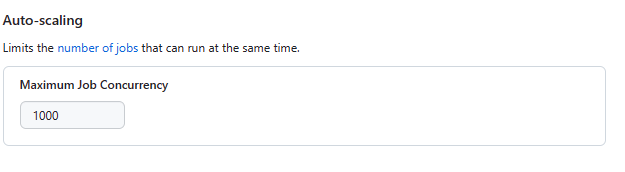
GitHub-hosted runners now support up to 1000 concurrent jobs for our 4 – 64 vCPU runners, enhancing their capability to handle large-scale CI/CD workloads.
Our runners are designed to automatically scale to meet your needs. The concurrency limit feature allows users to specify the maximum number of jobs that can run simultaneously to execute Actions workflows. Previously capped at 250, we've made backend improvements to now support a maximum of 1000 concurrent jobs for runners within the 4-64 vCPU range for Windows and Linux operating systems.
Enterprise or organization administrators can set this concurrency limit under the Auto-scaling setting. GitHub-hosted runners with 4 or more vCPUs are available on both the GitHub Team and Enterprise plans.
If you have any feedback to help improve this experience, be sure to post it on our GitHub Community Discussion.
We've added the ability to retrieve a repository's Contributing Guidelines via the GraphQL API. There is a new ContributingGuidelines object that's available under Repository object, when a CONTRIBUTING.md file is present.
This addition brings API parity with the other Community health files like CODE_OF_CONDUCT.md, which were previously available.
Auto-triage rules are a powerful tool to help you reduce false positives and alert fatigue substantially, while better managing your alerts at scale.
Starting today, you can now create your own custom rules to control how Dependabot auto-dismisses and reopens alerts – so you can focus on the alerts that matter, without worrying about the alerts that don’t.
What’s changing?
For any existing or future alerts that match a custom rule, Dependabot will perform the selected behavior accordingly. You can proactively filter out false positives, snooze alerts until patch release, and – as rules apply to both future and current alerts – manage existing alerts in bulk.
Frequently asked questions
Why is GitHub making this change?
At GitHub, we’ve been thinking deeply about how to responsibly address long-running issues around alert fatigue and false positives. Rather than over-indexing on one criterion like reachability or dependency scope, we believe that a responsibly-designed solution should be able to detect and reason on a rich set of complex, contextual alert metadata.
That’s why, moving forward, we’re releasing a series of ships powered by an underlying, all-new, flexible and powerful alert rules engine. Our first ship – Dependabot presets – leveraged our rules engine with GitHub-curated vulnerability patterns. Today’s ship exposes our rules engine so you can create your own rules, too.
Which criteria are supported?
Rules can be created across the following attributes:
Attribute
Description
severity
Alert severity, based on CVSS base score, across the following values: low, medium, high, and critical.
scope
Scope of the dependency: development (devDependency) or runtime (production).
package-name
Packages, listed by package name.
cwe
CWEs, listed by CWE ID.
ecosystem
Ecosystems, listed by ecosystem name.
manifest
Manifest files, listed by manifest path.
What behaviors are supported?
Today’s ship covers support for auto-dismissing alerts indefinitely as well as snoozing alerts until patch. Auto-dismissing ensures all activity is easily visible and can be caught by existing reporting systems and workflows, while also ensuring that alerts can be reintroduced if metadata across the alert changes.
How will this activity be reported?
Auto-dismissal activity is shown in webhooks, REST, GraphQL, and the audit log for Dependabot alerts. Alerts are dismissed without a notification or new pull request and appear as a special timeline event. As these alerts are closed, you’ll still be able to review any auto-dismissed alerts with the resolution:auto-dismissed filter.
Who can create and modify rules?
Auto-triage rules are free for open source repositories. Anyone who can enable Dependabot alerts for a public repository will be able to create custom rules for it. Customers of GitHub Advanced Security can create and manage custom rules across private repositories.
How do I reopen an automatically dismissed alert?
Like any manually dismissed alert, you can reopen an auto-dismissed alert from the alert list view or details page. This specific alert won’t be auto-dismissed again (by any other auto-dismiss rule).
What happens if alert metadata changes or advisory information is withdrawn?
Dependabot recognizes and immediately responds to any changes to metadata which void auto-dismissal logic. For example, if you change the dependency scope and the alert no longer meets the criteria to be auto-dismissed, the alert will automatically reopen.
In October 2022, we released a private beta adding linked SAML single sign-on (SSO) identities for relevant users to GitHub Enterprise audit log events.
We are expanding the private beta to now include linked identities within git events, making this information available across all relevant events.
We have implemented a fix so that GITHUB_REF and the github.ref context value return a fully-formed ref (e.g – refs/heads/main) when a workflow is triggered as a result of a pull request being merged. This change only impacts a small subset of workflows that trigger as a result of a pull request closing after being merged and that make use of GITHUB_REF or github.ref.
Previously, GITHUB_REF and github.ref were incorrectly returning a shortened ref (e.g. – main). These should always return a fully-formed ref regardless of the scenario.
Please visit our documentation for more details about using Actions context and variables.
Self-serve enterprise accounts can now grant member organizations permission to create sponsorships. Sponsorships created by a member organization will charge the enterprise account's credit card on file.
You can now export data from the risk and coverage pages to a comma-separated values (CSV) file. This feature supports exporting repository-specific data based on applied filters.
Dependency review now works with your dependencies from the dependency submission API. Dependency review enforces policies around vulnerabilities and acceptable licenses in the pull request. Previously, dependency review could not be used with another feature of the dependency graph called the dependency submission API. The dependency submission API helps developers get a more accurate set of transitive dependencies, particularly for complex ecosystems like Gradle or Scala which require a build to resolve all transitive dependencies.
To take advantage of this improvement, update to the latest version of the dependency review action, or follow the instructions in our documentation.
Administrators of EMU enterprises can use a token with the admin:enterprise scope to make GET requests from SCIM clients. With this read access, you can directly reconcile GitHub's understanding of SCIM-defined users and groups with your federated identity groups for auditing purposes.
Write requests to these APIs are possible through our published IdP applications, or through a new private beta that offers direct API access.
We're making changes to the IP addresses used by GitHub Enterprise Importer for outbound network connections. These changes will take affect at 00:00 UTC on September 18, 2023.
If you're running migrations with GitHub Enterprise Importer and you have IP allowlisting enabled on your migration source or target, or an Azure Blob Storage or Amazon S3 account which you use for migrations, then you'll need to update your allow list.
Users with two-factor authentication enabled can now begin the account recovery process from the password reset flow. Previously, the account password was needed to access 2FA account recovery, but passwords on 2FA-enabled accounts could only be reset with a valid second factor. If you lost your password and all of your second factors, you were locked out because you could not access account recovery. With this change, a user can recover their account as long as they can perform email verification and provide a recovery factor, such as an SSH key, PAT, or previously signed in device.
Once you have performed email verification and provided a recovery factor, your recovery will be manually reviewed by GitHub's support team, who will email you within three business days. If your request is approved, you'll receive a link that lets you disable 2FA on your account. After that, you can reset your password and regain access to your account.
In today’s update, we’re showing some love to our Copilot for Business admins with the release of the Copilot settings redesign and audit log integration!
💅🏻 Copilot for Business settings update
We’ve updated the Copilot for Business admin experience to provide an overview of important information and streamline the seat purchasing flow for Copilot. Quickly review the Copilot seats assigned and estimated charges at the top of the page, update your assignment settings without having to remember to hit a Save button, and verify the update to your bill when adding or removing users and teams.
🪵 Review Copilot updates with audit log integration
Tracing updates to settings or seat assignments is key to help admins troubleshoot unexpected behavior within their organizations. Until now, admins had to contact support to help understand changes but as of today, they can now review Copilot events by using the GitHub Audit Log. To ensure administrators can quickly review Copilot updates, we included a new filter titled “Copilot Activity”. Understand settings changes, policy updates, and seat addition/removals right from the Audit Log UI in your organization settings.