Facebook Like WordPress Plugin by Plulz

Keeping up with our plugins release we’re now launching the new Facebook Like a Lot Plugin for WordPress.

I know there are plenty of Like Plugins around, but none of then are really flexible and complete. One of the main qualitys of this one is that, besides being able to add the plugin in every page of your blog you will also be able to use the Like a Lot shortcode, allowing you to set any parameter you want to it and embending in any blog post type (pages, blogs, links, etc). Example:

[like_a_lot width="300" scheme="dark" send="true" faces="true"][/like_a_lot]

Would generate a Like box with 300px width, dark scheme from the Facebook default layouts, would allow to send the page link and also will show the users pictures.

To make things even easier the plugin will add a button to the tinyMCE editor, so you don’t have to remember all that code when adding a new like box.

For now I’m waiting the plugin to be added to the WordPress SVN, it will take around 3 days before it will be available for download.

Soon: Plulz Exclusive Themes

One of the reasons we haven’t released any Theme for WordPress is that we’re looking into ways that would make really good ones with a really good code.

By good code we mean code that have very good performance, easy to maintain and extensible, something we already do with the plugins. So far we have released the SEO Facebook Comment but plan to release many more, mostly focused on Facebook integration (at least for now).

The hardest part was that really good code on WordPress, as many programmers already know, can be a real headache. It is a great platform, with a huge community and with the best admin interface I have ever come across, but when comes to code it can be a real pain.

We plan to release a free e-commerce theme, hope to get it done in the next two weeks. Stay tuned ;)

How to get my Facebook User ID

It’s weird how you need your facebook user id for severall things, such as to give moderator power to some user (or yourself) in order to be able to, for example, moderate the SEO Facebook Comments. I mean it’s weird because despite being something that you need for many things there is no easier or direct way to get your User ID.

In order to get your user id you can go to this topic and post any comment after that hover your mouse over your username, click with the right button of the mouse on it, now click in “Copy Link Address” than paste anywhere (notepad for example, it will be a link like this https://www.facebook.com/profile.php?id=624300364 ) everything after the id= is your Facebook User ID

Now just inser it in the field “Admin ID” of the SEO Facebook Comments plugin and everything should work just fine.

Any doubts or problems, well, you could also leave a comment bellow.

How To Add States do the WooCommerce plugin?

I started creating a very small and fast eCommerce on WordPress, so i decided to give the WooCommerce Plugin a go.

Must say, the interface is pretty neat but lacks some extra support, like adding new states that I’m about to show you how to do. Btw, this is something really easy to acomplish, all you need is follow the bellow steps and everything should work just fine

1. Open the file countries.class.php in the classes folder inside woocommerce plugin folder.

2. Look for the code of your country, you can find that in the var $countries = array, for instance, the code for Brazil is BR

3. Look for the Line var $states = array(… (this will be right bellow the var $countries array)

4. Inside the above array, go to the last line of that array (will probabiliy be the USAF array), and now all you have to do is create a new one right bellow that, if I were to add the brazilian states I would do the following:

[crayon attributes lang="php"]
‘USAF’ => array(

‘AA’ => ‘Americas’ ,

‘AE’ => ‘Europe’ ,

‘AP’ => ‘Pacific’

), // NEVER FORGET THE COMMA

‘BR’ => array(

‘AM’ => ‘Amazonas’,

‘SP’ => ‘Sao Paulo’,

)
[/crayon]
Just a heads up, the plugin is bugging for states with UTF-8 caracters, so you have to add Sao Paulo instead of São Paulo or any other state name with é, è, â… you got the idea.

Save the file, upload and profit :)

Any doubts, leave a comment bellow.

Facebook Comments Prestashop Module

Prestashop Version: Prestashop 1.4+

Module Version: 1.0

This module were build to integrate the Facebook Comments system in all your products page. It also integrates perfectly with the Like a Lot plugin for Facebook.

The best advantage in using this plugin is that when people comment on pages Facebook automatically generates a link on that persons timeline to the page where the comment were placed.

So instead of only having some comments on your page you can get a lot of traffic from Facebook also.

Download Link

Facebook Comments Talk a Lot Prestashop Module

Image Gallery


Clean Prestashop Carousel Module

Prestashop Version: Prestashop 1.4 +

Module Version: 1.1

A carousel with a very clean and light layout build on top of jQuery technology and completely Flash Free.

With this module you will be able to customize, directly from your Admin Panel the following options:

  • Where to append it, can choose beetween the Home prestashop Hook or the Top hook
  • Width and height of the images you intend to use on your carroussel
  • The transition time beetween the itens of the caroussel (in ms)
  • Insert  a max of 5 itens
  • Decrease from 5 to any number of itens if you want to
  • Share our link to help us create many more Free Prestashop Modules :D

Module Download Link

Clean Carousel Prestashop Module

Image Gallery

Prestashop Module – Facebook Like a Lot

Prestashop Version: Prestashop 1.4+

Module Version: 1.2.1

Module Images: at the bottom of the page

Improve your presence on the social networks with this incredible and easy to use prestashop module, insert a Like and a Send button in all your products page and also make your Product Page an Facebook Open Graph Object making it easily discoverable in Facebook, like if it was a Fan Page.

In this module Admin Panel you will be able to:

  • Choose the language of your country (default to English, en_US)
  • Input your own Facebook APP ID or use the default one provided with the module
  • Select to show users pictures or not
  • Show/Hide the new send button togheter with the Like Button
  • Choose the text of the like button beetween LIKE or RECOMMEND
  • Share our link to help us create many more Free Prestashop Modules =D

This module also makes your Product page an Open Graph Object, that mean when someone search for a product of your site that have been shared on facebook he might find your product exactly like it was a Fan Page, instead you got a link to your product on your site

The following OG (Open Graph) tags are used:

og:title-> get the name of the title of the product
og:type -> 
setted to ‘product’, so facebook knows that your page is a product
og:image ->
 also make the Send button always render the proper product image
og:description -> 
get the short description of your product
og:url ->
 your current product page url

Below is a gallery with the images on how this plugin looks like when installed. For any help needed or to just let us know what you think about our modules use the comment section below!

Facebook Like a Lot Prestashop Module

Image Gallery

How to create a Facebook APP

I have been asked a lot this question lately, mostly because of my really successfull plugin SEO Facebook Comments.

To make the plugin work you need to correctly create a Facebook App and configure all of the needed information in the plugin that you get from the Facebook App.

So here´s how to do it, it´s really easy and straightfoward, especially since the last Facebook Developers redesign:

First, go to the page http://www.facebook.com/developers

It will ask you to login (if you´re not already). Once looged in you´re going to be taken to the following page.

BERJAYA

As you can see, In the right top corner of your page you´re going to see a button called + Create New App, just click on it

BERJAYA

Insert a nice name for your APP and you can leave the APP NAMESPACE field blank, just agree and then click in CONTINUE. Correctly type the Captcha text ( a challenge sometimes, I know) and just click Continue.

BERJAYA

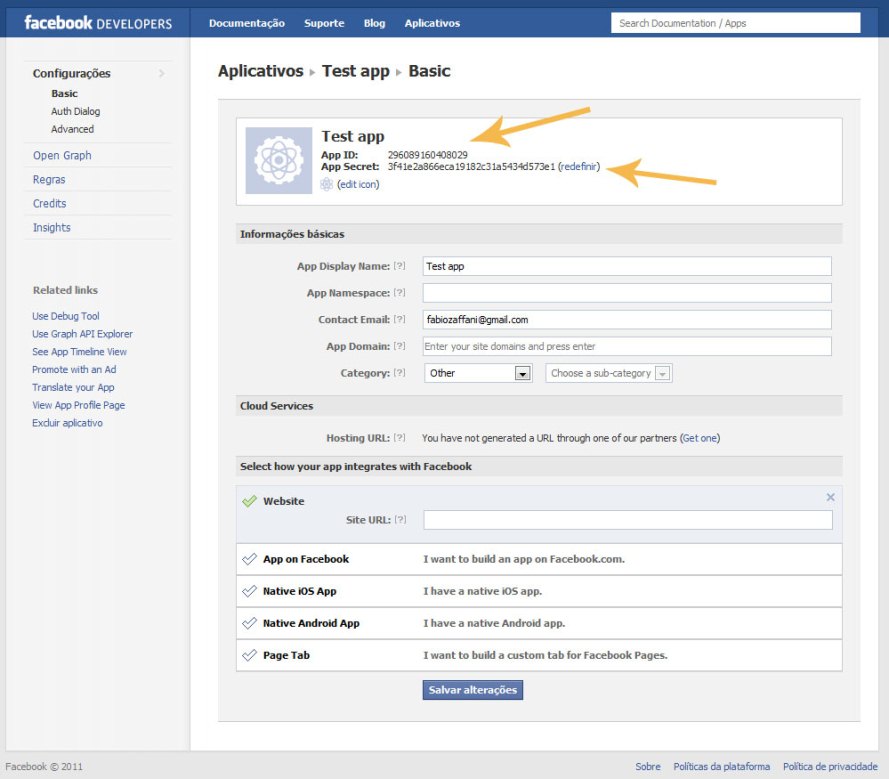
We´re almost done! As you can see in the above picture we already have an App ID and App Secret for our app, now there is just one last thing to do. Click in Website and type the full URL for your domain, taking this blog as an example I would type http://www.plulz.com in the mentioned box.

Now that everything is set just SAVE IT, now go back to your SEO Facebook Comment Admin Page and insert the App ID, App Secret and your facebook e-mail and everything will work just fine ;)

Any doubts or problems feel free to leave a message in the comments bellow.