After testing many products, I have found Formidable all that I need!


Last updated on July 10, 2025 by Formidable Team
Learn how to let users edit their WordPress profiles on the front end! Discover simple steps and plugins to improve user experience in WordPress user profiles.
Approximate read time: 6 minutes
A registration form can be a simple yet effective tool for encouraging repeat visits to your website and perhaps even monetizing your content.
However, after some time, your users will need to edit the details they submitted initially, and they may be reluctant to contact your customer service department to do so. This is where a front-end editor comes in. By allowing website members to edit their personal information, you improve their overall experience.
In this post, we'll discuss the importance of a front-end profile page and how to let users edit their profiles via a simple website form.
Let’s get started!
Upgrade your WordPress site with powerful, flexible forms.
Creating a user registration form is a good way to improve visitor retention on your website. If you plan to build a revenue-generating membership site, registered users must return and edit their custom user profiles.
The information in this profile will change over time. This may be due to personal preference, such as adding a new profile picture, or it may be more practical, like changing account passwords or email addresses.
If your members cannot edit their profiles and must email you anytime they want to change a small detail, they may abandon your website.
Thankfully, there are WordPress user profile plugins that can solve this problem. Formidable Forms gives your members frontend access and lets them edit their user profiles as needed.
Providing a WordPress user profile page on your website improves user experience and reduces the strain on your customer service team.
From Idea to Reality in Minutes. Build Powerful Forms, Dashboards, Apps and More.
Formidable Forms makes advanced site building simple. Launch forms, directories, dashboards, and custom WordPress apps faster than ever before.
Now that we’ve explored the benefits of a profile plugin for WordPress let’s simulate the steps you must take to set it up.
For this tutorial, we'll use Formidable Forms, the most advanced form builder on WordPress. Thanks to its WordPress User Registration plugin, you can easily handle creating and managing user profiles. From assigning user roles to restricting users to creating a user directory — Formidable handles it all.
If you haven't already used it on your website, download and activate the Formidable Forms plugin.
Once done, go to your WordPress dashboard to create a form. Navigate to Formidable → Forms and click on Add New.
You can either choose a Blank Form and add fields to your user profile form or select the Edit User Profile form template shown below:
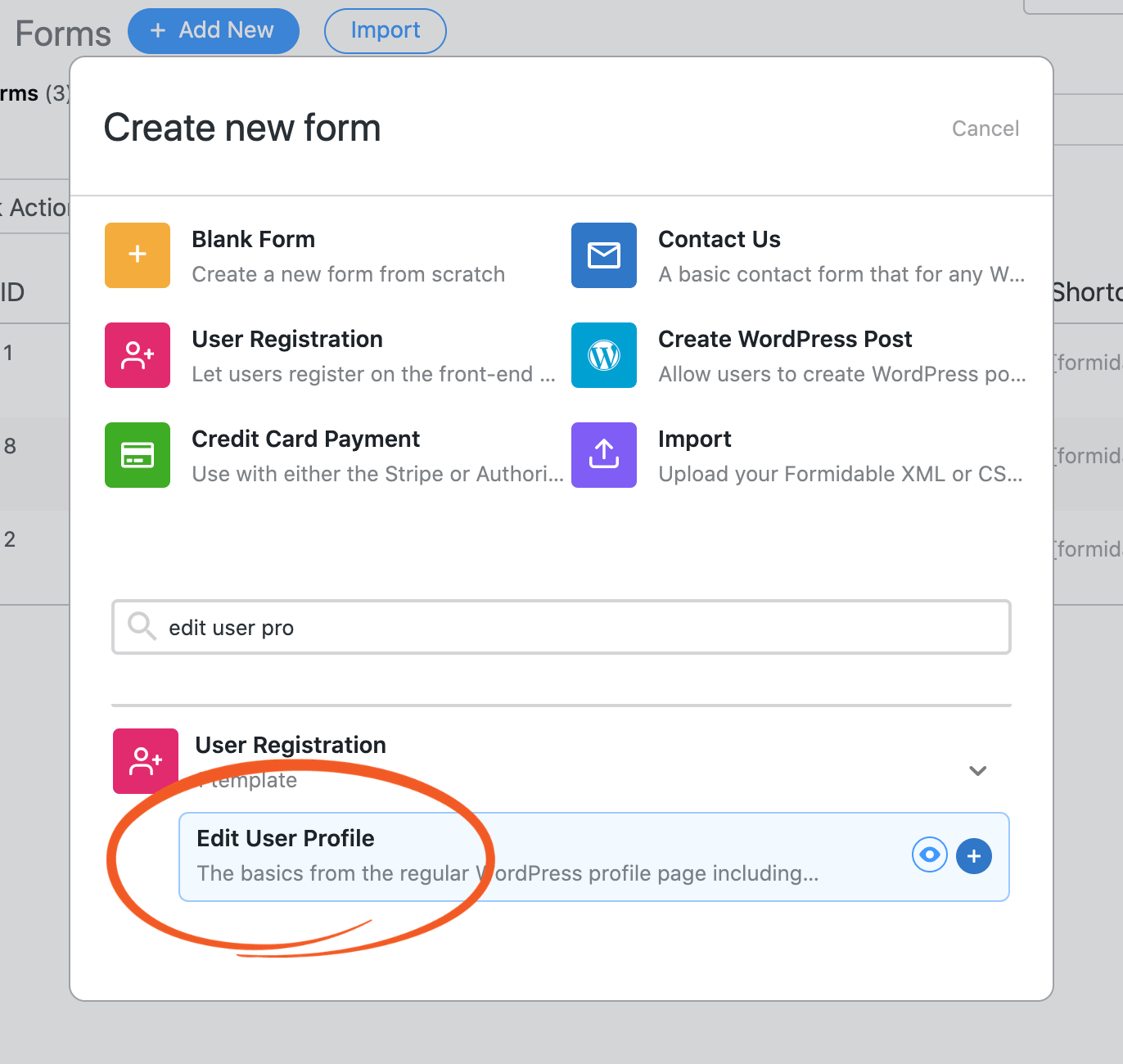
In the subsequent popup, give the form a name. You may also enter an optional description to help you identify this form on your WordPress dashboard. Afterward, click Create.
Using the drag and drop form builder, create custom form fields as you wish. For example, you may want to allow users to update their phone number, email, and home address.
Since the users accessing this form will be editing pre-existing information, you must automatically populate the fields with their details.
You can do this by using dynamic default values.
Add the [user_meta key="meta_name"] shortcode to the fields you want to auto-populate, as shown in the image below.
Replace "meta_name" with the information that you want to display. For example, [user_meta key="home_address"] will display the user’s current home address.
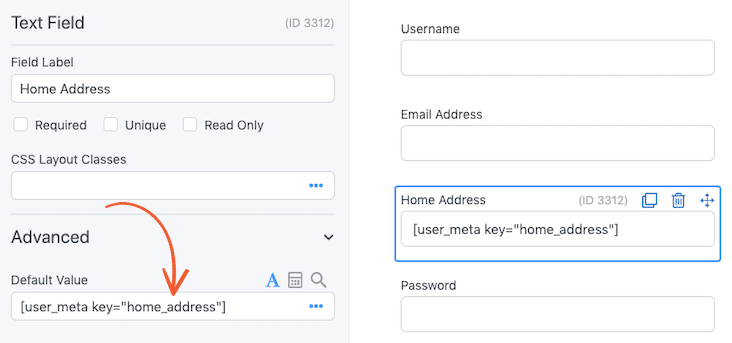
You may repeat this action for the custom fields you want to let your subscribers update from the front end. This allows the user to update the old information.
Only members will need to edit their profile details. So, it's best to limit the Edit User Profile form to logged-in users only.
To set this restriction, navigate to Settings → Form Permissions.
Here, select the checkboxes labeled Limit form visibility to and Limit number of entries to one per. For both of these settings, choose Logged-in Users from the accompanying dropdown:
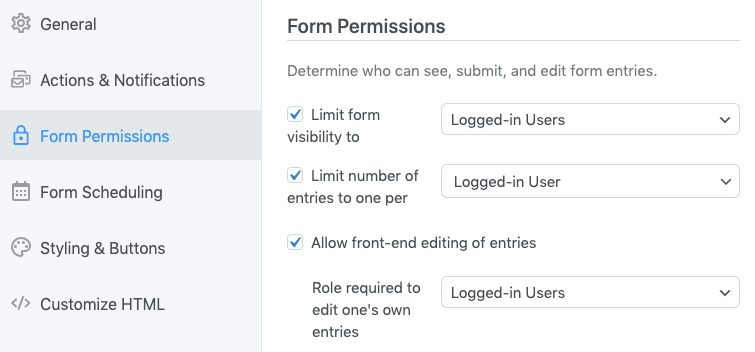
Afterward, select Allow front-end editing of entries.
When the Role required to edit one's own entries option appears, open the accompanying dropdown and select Logged-in Users.
Next, you must map the Edit User Profile form fields to your registration settings. This ensures that subscribers' changes are updated immediately after they submit the form.
Go to Settings and select Actions & Notifications. Then, click on Register User:
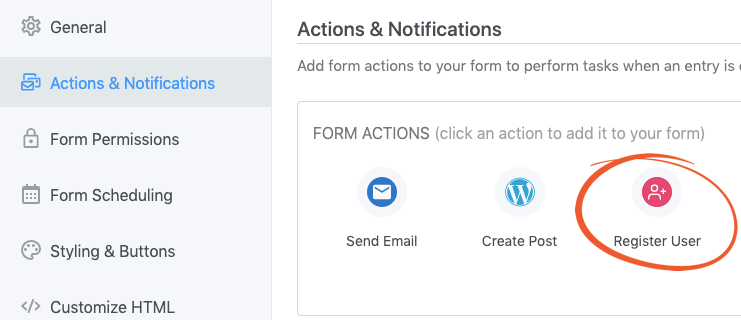
If you haven’t already installed the Register User add-on, Formidable Forms will prompt you to do so. On the subsequent page, fill out the form as follows:
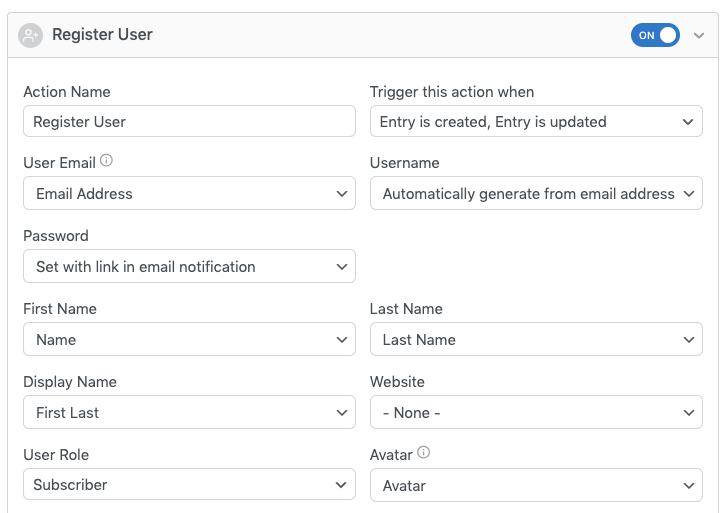
Next, you must choose the trigger action to edit users' profile information. You can view all of your available options using the Trigger this action when dropdown:
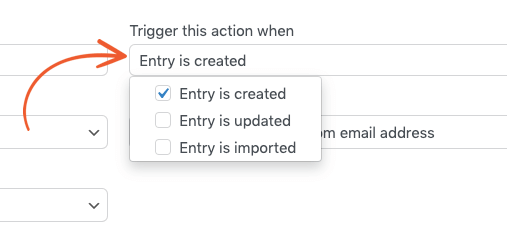
We recommend selecting Entry is created and Entry is updated. This will update the user’s profile when they submit the form.
When you’re happy with your form, click on Save. On your WordPress dashboard, navigate to Formidable → Forms:
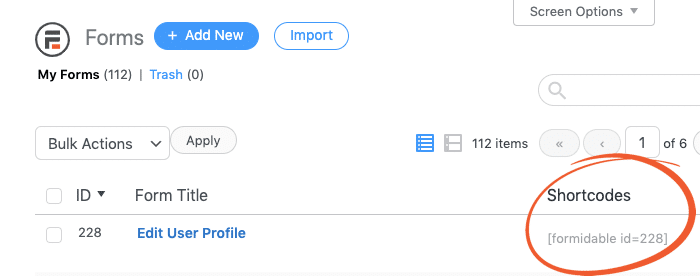
Copy the shortcode for the Edit User Profile form you just created. Then, navigate to the user profile page where you want to display the form. You can create a separate WordPress registration page or use the profile page to register.
Publish the form and remember to Save.
Your WordPress user profile page is now ready to use. Subscribers can edit their profiles from their desktop or mobile devices.
Read more: How to create a login page in WordPress.
During your user registration process, you'll collect a lot of information. However, these details are not guaranteed to remain valid forever.
It is prudent to give users a way to update their profiles manually instead of always relying on your support staff. A WordPress profile builder plugin provides this functionality.
Here is a summary of how your site members can edit their WordPress user profiles with Formidable Forms:
To create a membership profile for your WordPress site subscribers and leverage other advanced features, download Formidable Forms today.
Check out our pricing plans now to see which packages meet your needs.
This article may contain affiliate links. Once in a while, we earn commissions from those links. But we only recommend products we like, with or without commissions.


 How to Create WordPress User Accounts [5 Steps!]
 7 Best Ways To Stop WordPress Registration Spam
 How To Create a WordPress Custom Login Page [Step by Step]
 How to Enable WordPress User Registration [2 Easy Methods!]
 How to Use the Best WooCommerce Profile Builder Plugin
 How To Create an Ajax Registration Form in WordPress